
- Buy Crypto
- Markets
- Futures
- Spot
- Copy Trade
 Earn
Earn- More
How to Withdraw from WEEX: Step-by-Step Guide, Fees, and Troubleshooting

Struggling to figure out how to withdraw from WEEX? Are you anxious because your WEEX withdrawal hasn’t reached your wallet despite submitting a request?
Good news: learning how to withdraw from WEEX is simple and can be done in a few steps. This guide explains the WEEX withdrawal process, associated fees, and solutions for common issues, ensuring you can withdraw funds smoothly.
Understanding WEEX Withdrawal Methods
WEEX supports withdrawals exclusively in cryptocurrencies. Fiat currencies like JPY or USD cannot be withdrawn directly. To withdraw from WEEX, you transfer tokens to an external wallet or another exchange.
Additionally, WEEX offers an “internal transfer” feature to send funds to other WEEX users without fees.
Each WEEX withdrawal incurs a network fee, which varies by coin and blockchain network. For instance, withdrawing USDT via ERC20 costs a few USDT, while TRC20 is around 3 USDT.
For security, WEEX may temporarily restrict withdrawals or require KYC verification. If this happens, wait 24 hours and retry your WEEX withdrawal.

Step-by-Step Guide: How to Withdraw from WEEX
Mastering how to withdraw from WEEX is easy with the official website or mobile app. Follow these steps to complete your WEEX withdrawal.
Step 1: Access the WEEX Platform
Visit the WEEX official website to start your withdrawal.
Log in with your registered email and password. For mobile users, open the WEEX app and sign in to begin the WEEX withdrawal process.
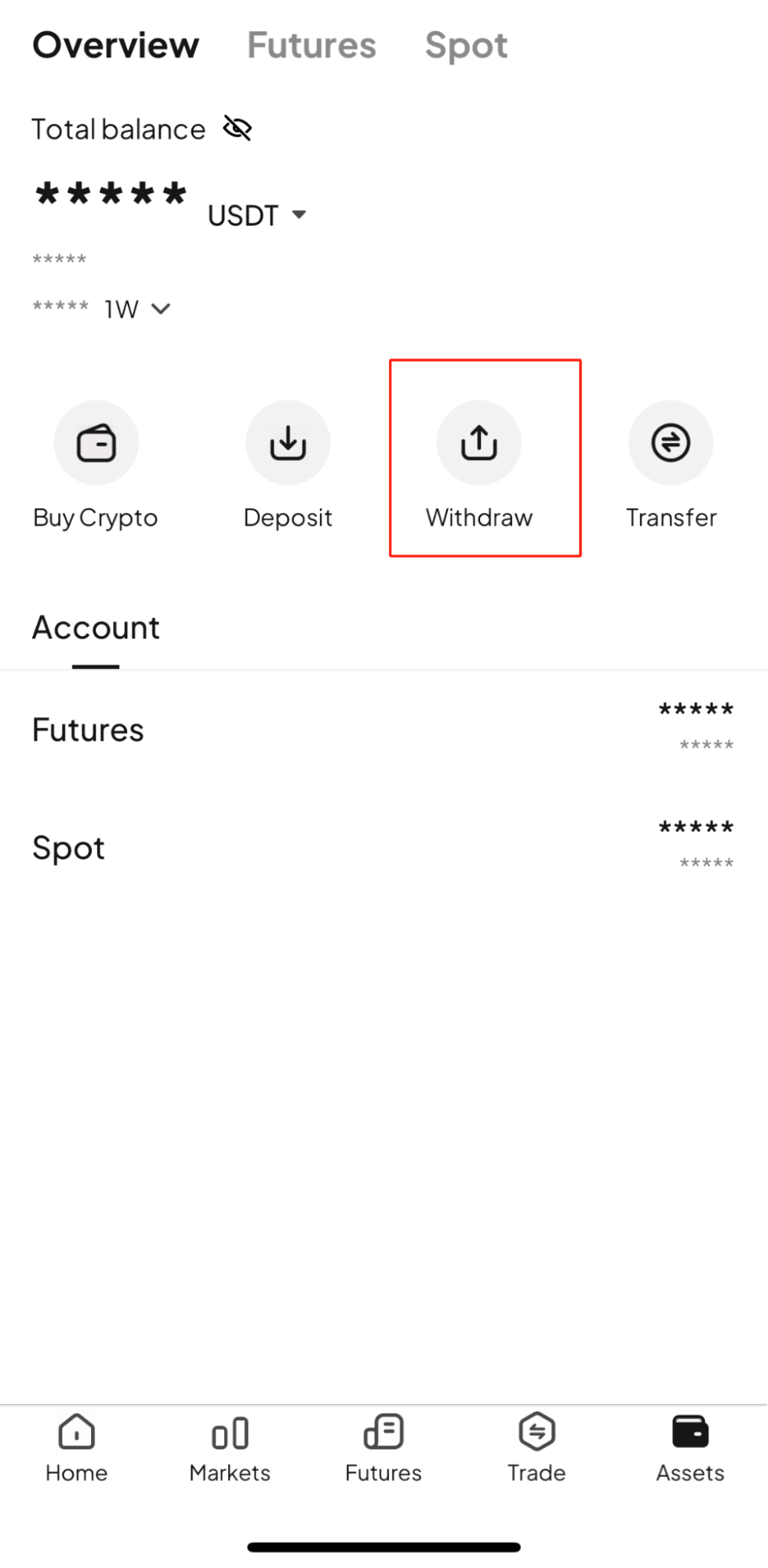
Step 2: Select “Withdraw” from the Wallet
Once logged in, locate the wallet (assets) icon on the WEEX interface and click it (or tap on the app).
Choose Withdraw from the menu to access the WEEX withdrawal screen.
Step 3: Choose the Coin to Withdraw
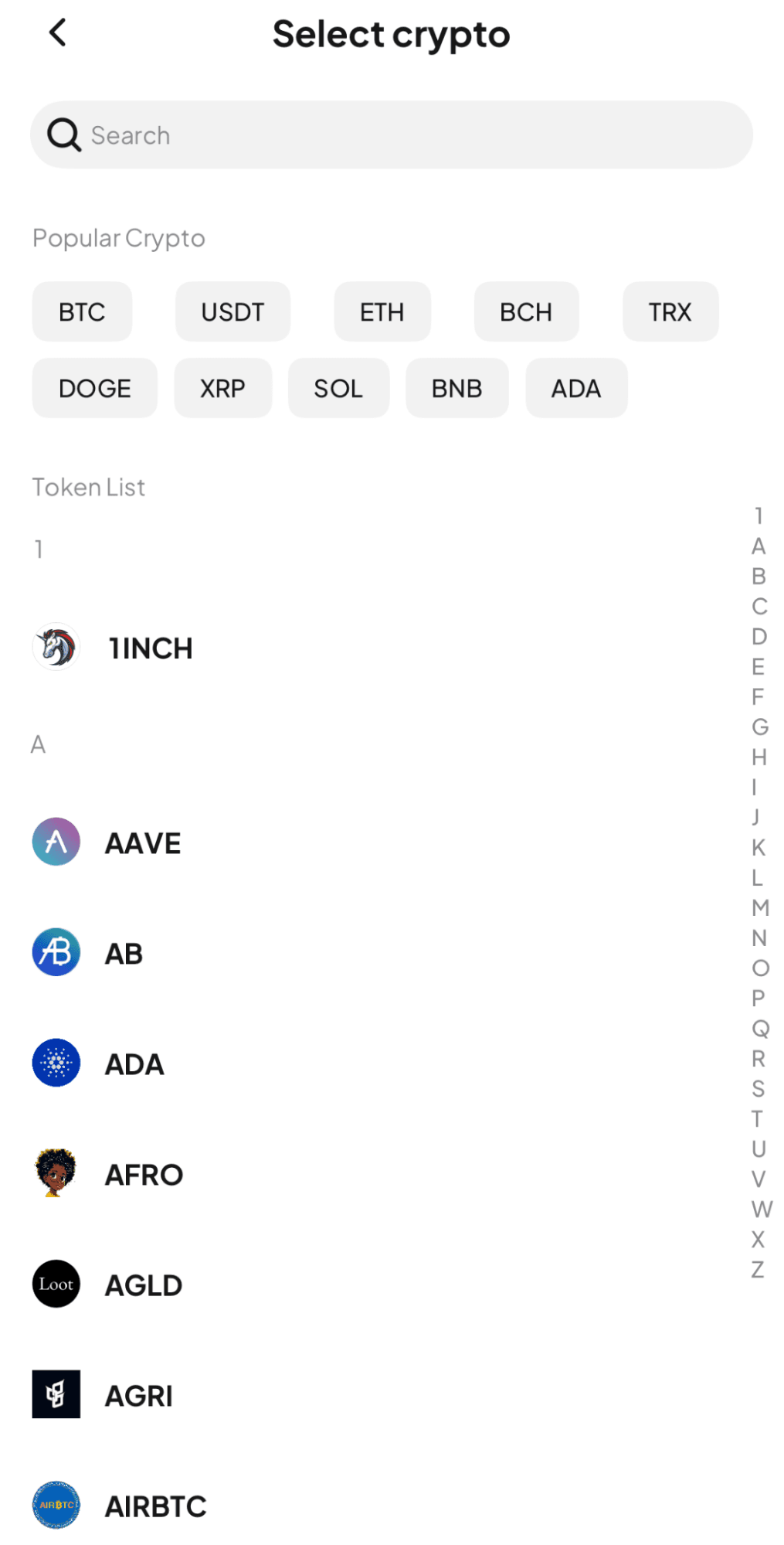
On the WEEX withdrawal screen, select the cryptocurrency you want to withdraw (e.g., BTC, ETH, USDT).
Verify your wallet balance and withdrawable amount before proceeding with your WEEX withdrawal.
Step 4: Enter Network, Address, and Amount
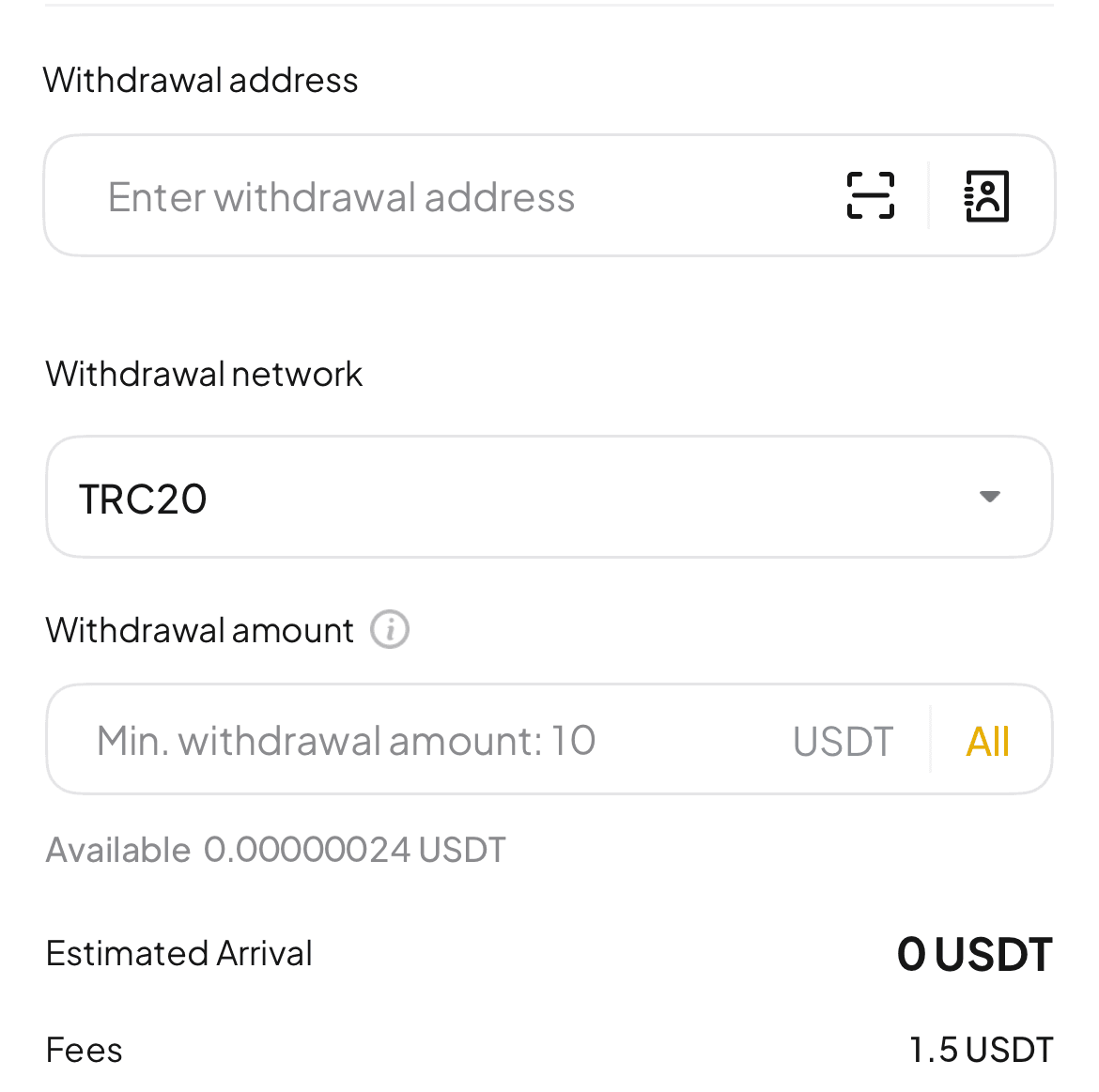
Specify the blockchain network for your WEEX withdrawal (compatible with your chosen coin).
Carefully input the destination wallet’s address—mistakes can lead to lost funds.
Enter the amount you wish to withdraw from WEEX and double-check all details.
Step 5: Confirm and Submit the Withdrawal
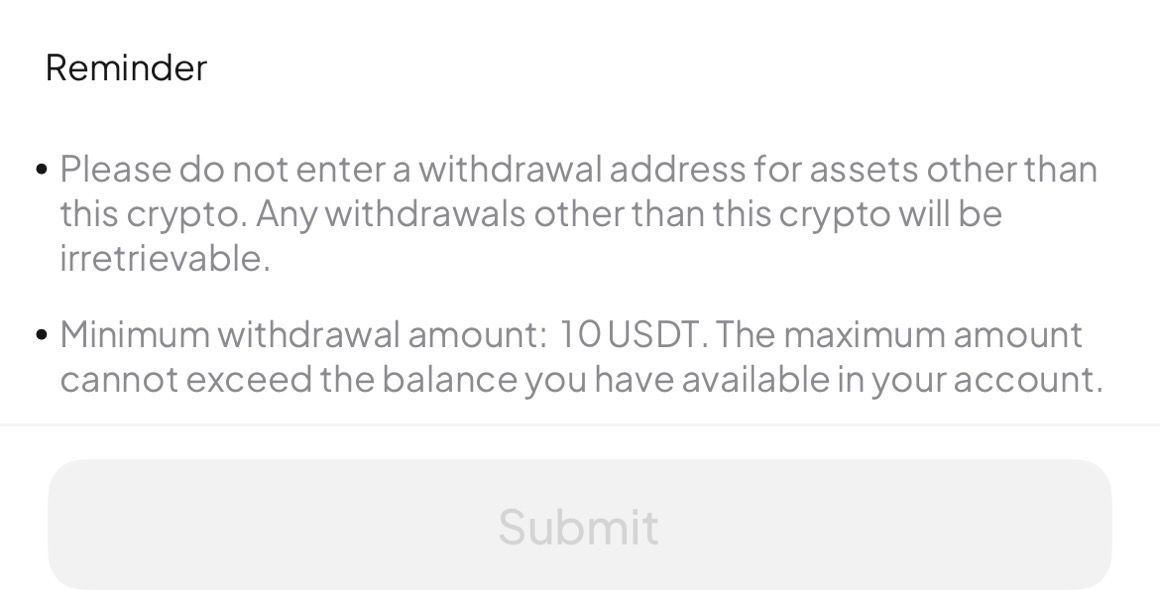
Review your WEEX withdrawal details, then tap Withdraw.
You may need to enter an authentication code sent via email or SMS for security. Complete the verification to finalize your WEEX withdrawal request.
Once approved, the WEEX withdrawal processes on the blockchain, taking a few minutes to tens of minutes to reach your wallet.
Why Can’t I Withdraw from WEEX? Causes and Fixes
Encountering issues when trying to withdraw from WEEX? Below are common reasons and solutions to ensure your WEEX withdrawal succeeds.
Check Your WEEX Withdrawal History
Visit the WEEX withdrawal history to review your request’s status or error messages.
A “Processing” or “Pending Approval” status may indicate a delay. Security measures, like a recent password change, can lock WEEX withdrawals for 24 hours.
Ensure you’re not exceeding unverified account limits—completing KYC boosts your WEEX withdrawal limit.
Verify that two-factor authentication or email verification was completed correctly.
If WEEX is undergoing maintenance, check the official website or social media for updates and wait before retrying your withdrawal.
Verify Network and Address Details
Incorrect destination addresses or blockchain networks can block your WEEX withdrawal.
Always copy-paste the wallet address and select the correct network (e.g., ERC20 or TRC20) to avoid losing funds.
Network congestion may also delay your WEEX withdrawal, as coins like USDT require multiple blockchain confirmations. Monitor the status patiently after submitting your WEEX withdrawal request.
Contact WEEX Support
If you still can’t withdraw from WEEX, contact their support team via chat or email through the official website.
Provide details like coin type, amount, date, and transaction ID for faster resolution of your WEEX withdrawal issue.
Support may respond in English—use translation tools if needed. WEEX offers 24/7 support, though responses may take time. Follow any additional instructions, such as KYC, to complete your withdrawal.
FAQs: How to Withdraw from WEEX
Here are answers to common questions about how to withdraw from WEEX, covering fees, processing times, and error fixes.
How to Minimize WEEX Withdrawal Fees?
WEEX withdrawal fees depend on blockchain network costs, with no extra platform charges.
For example, withdrawing USDT via ERC20 costs ~3 USDT, while TRC20 is ~1.5 USDT. Choose cheaper networks to save on your WEEX withdrawal.
Use WEEX’s internal transfers to send funds to other WEEX users for free, avoiding blockchain fees altogether.
How Long Does a WEEX Withdrawal Take?
WEEX processes withdrawals within 15–30 minutes, but blockchain congestion or confirmations may extend the time.
Bitcoin withdrawals require ~10 minutes per confirmation, while USDT needs 12 (ERC20) or 10 (TRC20) confirmations.
Security reviews may delay your WEEX withdrawal. Check the status via WEEX’s history or track the TXID. Contact support if funds don’t arrive.
What to Do If a WEEX Withdrawal Fails?
If your WEEX withdrawal fails, check the history for “Processing” or “Failed” statuses.
Recent password changes or new device logins may lock WEEX withdrawals for 24 hours.
Verify the address and network—errors here can cause permanent fund loss.
If unresolved, reach out to WEEX support promptly to fix your withdrawal issue.
Conclusion
This guide detailed how to withdraw from WEEX, including fees, processing times, and troubleshooting tips.
WEEX withdrawal fees vary by network, so opt for cost-effective options like TRC20 or internal transfers.
Most WEEX withdrawals process quickly, though blockchain delays or reviews may occur.
If you face issues, verify details calmly and contact WEEX support for help.
Ready to withdraw from WEEX? Register now and start secure cryptocurrency trading with confidence.
You may also like

What is Miracle World (MW) Coin?
The Miracle World (MW) token recently made its debut on WEEX, opening a new avenue for crypto enthusiasts…

Rainbow (RNBW) Coin Price Prediction & Forecasts for January 2026 – Potential Surge After Fresh WEEX Listing
Rainbow (RNBW) Coin has just hit the market with its listing on WEEX Exchange today, January 29, 2026,…

LEXAI USDT Pair Debuts on WEEX with LEXAI Coin Listing
WEEX Exchange is thrilled to introduce LEXAI (LEXAI) Coin, an innovative token powering an open AI network, now…
What is ASML Holding NV Tokenized Stock (ASMLON) Coin
The anticipation in the crypto world is palpable with the new listing announcement: ASML Holding NV Tokenized Stock…

WEEX Launches ASMLON USDT for ASML Holding NV Tokenized Stock Coin
WEEX Exchange has officially listed the ASMLON/USDT trading pair, bringing tokenized exposure to ASML Holding NV stock to…

What is Rainbow (RNBW) Coin?
Rainbow (RNBW), a newly listed token pair on WEEX, is now open for trading as of January 29,…

RNBW USDT World Premiere on WEEX: Rainbow (RNBW) Coin Listing Jan 29
WEEX Exchange is thrilled to announce the world premiere listing of Rainbow (RNBW) Coin, bringing fresh opportunities for…

STARKBOT Coin Price Prediction & Forecasts for January 2026: Could It Surge 50% Amid AI Crypto Hype?
STARKBOT Coin just hit the market today, January 29, 2026, with its listing on major exchanges, sparking immediate…
What is StarkBot (STARKBOT) Coin?
The crypto world welcomes StarkBot (STARKBOT), a promising token recently listed on WEEX, with trading kicking off on…
STARKBOT USDT Exclusive Debut: StarkBot (STARKBOT) on WEEX
StarkBot (STARKBOT), the innovative crypto-native AI assistant, has made its global exclusive first launch on WEEX Exchange, exciting…
What is Bitway (BTW) Coin?
Bitway (BTW) Coin has officially launched on the WEEX Exchange, with trading opening on January 29, 2026. As…

Bitway (BTW) Coin World Premiere on WEEX with BTW USDT
As a seasoned crypto trader who’s tracked market launches on platforms like CoinMarketCap, I’m excited about Bitway (BTW)…
What is Donald Duck (DONALD) Coin?
Recently, the much-anticipated Donald Duck (DONALD) token was listed on WEEX Exchange, marking a significant moment for cryptocurrency…
WEEX Exclusive: Donald Duck (DONALD) USDT Debut
WEEX Exchange proudly announces the global exclusive first launch of Donald Duck (DONALD) coin, now live for trading…

What is 3KDS (3KDS) Coin?
The 3KDS (3KDS) token is now listed on WEEX, marking an exciting addition to the vibrant crypto market.…
3KDS USDT Pair Debuts on WEEX with 3KDS Coin Listing
As a seasoned crypto trader with over a decade navigating Web3 markets, I’ve seen projects like 3KDS gain…
What is United States Oil Tokenized Fund (USOON) Coin?
In an exciting development for crypto enthusiasts, the United States Oil Tokenized Fund (Ondo) Coin, abbreviated as USOON,…
USOON USDT Trading Debuts on WEEX with United States Oil Tokenized Fund (Ondo) (USOON) Coin
WEEX Exchange is thrilled to announce the listing of United States Oil Tokenized Fund (Ondo) (USOON) coin, opening…
What is Miracle World (MW) Coin?
The Miracle World (MW) token recently made its debut on WEEX, opening a new avenue for crypto enthusiasts…
Rainbow (RNBW) Coin Price Prediction & Forecasts for January 2026 – Potential Surge After Fresh WEEX Listing
Rainbow (RNBW) Coin has just hit the market with its listing on WEEX Exchange today, January 29, 2026,…
LEXAI USDT Pair Debuts on WEEX with LEXAI Coin Listing
WEEX Exchange is thrilled to introduce LEXAI (LEXAI) Coin, an innovative token powering an open AI network, now…
What is ASML Holding NV Tokenized Stock (ASMLON) Coin
The anticipation in the crypto world is palpable with the new listing announcement: ASML Holding NV Tokenized Stock…
WEEX Launches ASMLON USDT for ASML Holding NV Tokenized Stock Coin
WEEX Exchange has officially listed the ASMLON/USDT trading pair, bringing tokenized exposure to ASML Holding NV stock to…
What is Rainbow (RNBW) Coin?
Rainbow (RNBW), a newly listed token pair on WEEX, is now open for trading as of January 29,…


 App
App